改變 Prosilver 風格--將個人資料顯示在左邊
發表於 : 2008-01-20 15:18
有些人問到,如何讓 Prosilver 風格將個人資料預設顯示在左邊,就像 subsilver 風格一樣。
1. 首先,我們必須確認附加檔案盒不會被個人資料欄位從文章中分隔出。
--開啟--
styles/prosilver/theme/content.css
--找到--
--取代成--
2. 其次,我們將改變 .postbody 風格的 float 值由左至右。
--開啟--
styles/prosilver/theme/content.css
--找到--
--取代成--
3. 我們改變 .postprofile 風格的 float 值由右至左,以及移動白色垂直的分隔線到右邊。
--開啟--
styles/prosilver/theme/content.css
--找到--
--取代成--
4. 下一步:
--找到--
--取代成--
5. 下一步:
--開啟--
styles/prosilver/theme/colours.css
--找到--
--取代成--
6. 首先,我們需要移除目前顯示在文章的 div 之圖片。
--開啟--
styles/prosilver/template/viewtopic_body.html
--找到--
--刪除其中--
7. 現在,我們需要增加 postprofile dl 要素。
--開啟--
styles/prosilver/template/viewtopic_body.html
--找到--
--取代成--
8. 下一步:
--開啟--
styles/prosilver/template/ucp_pm_viewmessage.html
--找到--
--刪除其中--
9. 下一步:
--找到--
--取代成--
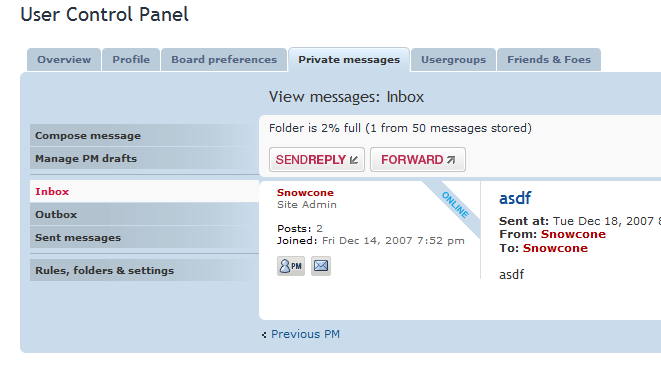
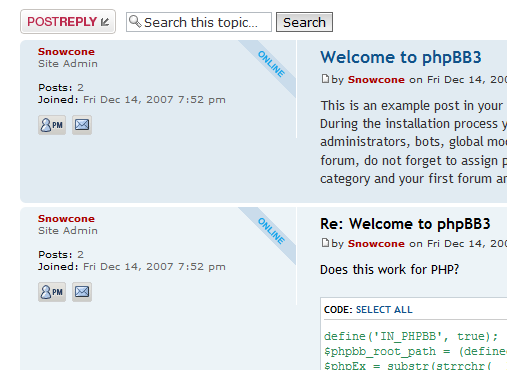
如此一來,將可正確地如同 subsilver 風格,將個人資料置放在文章以及私訊的左邊。
在私訊中如下圖:
在文章中如下圖:
--
資料來源:
http://www.phpbb.com/kb/article/prosilv ... s-on-left/
1. 首先,我們必須確認附加檔案盒不會被個人資料欄位從文章中分隔出。
--開啟--
styles/prosilver/theme/content.css
--找到--
代碼: 選擇全部
    /* Attachments
    ----------------------------------------*/
    .attachbox {
       float: left;
       width: auto;
       margin: 5px 5px 5px 0;
       padding: 6px;
       background-color: #FFFFFF;
       border: 1px dashed #d8d8d8;
       clear: left;
}代碼: 選擇全部
    /* Attachments
    ----------------------------------------*/
    .attachbox {
       float: left;
       width: auto;
       margin: 5px 5px 5px 0;
       padding: 6px;
       background-color: #FFFFFF;
       border: 1px dashed #d8d8d8;
       clear: right;
}--開啟--
styles/prosilver/theme/content.css
--找到--
代碼: 選擇全部
/* Post body styles
----------------------------------------*/
.postbody {
padding: 0;
line-height: 1.48em;
color: #333333;
width: 76%;
float: left;
clear: both;
}
代碼: 選擇全部
/* Post body styles
----------------------------------------*/
.postbody {
padding: 0;
line-height: 1.48em;
color: #333333;
width: 76%;
float: right;
clear: both;
}
--開啟--
styles/prosilver/theme/content.css
--找到--
代碼: 選擇全部
/* Poster profile block
----------------------------------------*/
.postprofile {
/* Also see tweaks.css */
margin: 5px 0 10px 0;
min-height: 80px;
color: #666666;
border-left: 1px solid #FFFFFF;
width: 22%;
float: right;
display: inline;
}
代碼: 選擇全部
/* Poster profile block
----------------------------------------*/
.postprofile {
/* Also see tweaks.css */
margin: 5px 0 10px 0;
min-height: 80px;
color: #666666;
border-right: 1px solid #FFFFFF;
width: 22%;
float: left;
display: inline;
}
--找到--
代碼: 選擇全部
.pm .postprofile {
border-left: 1px solid #DDDDDD;
}
代碼: 選擇全部
.pm .postprofile {
border-right: 1px solid #DDDDDD;
}
--開啟--
styles/prosilver/theme/colours.css
--找到--
代碼: 選擇全部
.online {
   background-image: url("{T_IMAGESET_LANG_PATH}/icon_user_online.gif");
}
代碼: 選擇全部
.online {
   background-image: url("{T_IMAGESET_LANG_PATH}/icon_user_online.gif");
   margin-top: -5px;
}

.online dt {
   margin-top: 5px;
}
--開啟--
styles/prosilver/template/viewtopic_body.html
--找到--
代碼: 選擇全部
<div id="p{postrow.POST_ID}" class="post <!-- IF postrow.S_ROW_COUNT is odd -->bg1<!-- ELSE -->bg2<!-- ENDIF --><!-- IF postrow.S_UNREAD_POST --> unreadpost<!-- ENDIF --><!-- IF postrow.S_POST_REPORTED --> reported<!-- ENDIF --><!-- IF postrow.S_ONLINE and not postrow.S_IGNORE_POST --> online<!-- ENDIF -->">
代碼: 選擇全部
<!-- IF postrow.S_ONLINE and not postrow.S_IGNORE_POST --> online<!-- ENDIF -->
--開啟--
styles/prosilver/template/viewtopic_body.html
--找到--
代碼: 選擇全部
<dl class="postprofile" id="profile{postrow.POST_ID}">
代碼: 選擇全部
<dl class="postprofile<!-- IF postrow.S_ONLINE and not postrow.S_IGNORE_POST --> online<!-- ENDIF -->" id="profile{postrow.POST_ID}">
--開啟--
styles/prosilver/template/ucp_pm_viewmessage.html
--找到--
代碼: 選擇全部
<div id="post-{MESSAGE_ID}" class="panel clearfix post pm-panel-message pm<!-- IF S_POST_UNAPPROVED or S_POST_REPORTED --> reported<!-- ENDIF --><!-- IF S_ONLINE --> online<!-- ENDIF -->">
代碼: 選擇全部
<!-- IF IF S_ONLINE --> online<!-- ENDIF -->
--找到--
代碼: 選擇全部
<dl class="postprofile" id="profile{MESSAGE_ID}">
代碼: 選擇全部
<dl class="postprofile<!-- IF S_ONLINE --> online<!-- ENDIF -->" id="profile{MESSAGE_ID}">
在私訊中如下圖:
在文章中如下圖:
--
資料來源:
http://www.phpbb.com/kb/article/prosilv ... s-on-left/